TruePace
Native macOS and iOS focus timer with adaptive work modes, intelligent check-ins, and flow state tracking.
The Problem
Traditional Pomodoro timers assume every work session is the same: 25 minutes on, 5 minutes off, repeat. But deep work doesn’t follow a fixed schedule. Some tasks need 10-minute bursts, others need uninterrupted 90-minute flow states. Switching between coding, writing, and planning requires different rhythms. Forcing a single timer pattern onto varied work types leads to either breaking flow or abandoning the timer entirely.
What I Built
TruePace runs natively on macOS (menu bar) and iOS (mobile) with six work modes designed around how focus actually works:
Micro (5-15 min) — Quick tasks, email triage, code reviews. Short bursts with minimal overhead. No check-ins needed because the session ends before distraction sets in.
Pomodoro (25/5) — The classic rhythm for structured work. Four cycles with a longer break. Best for tasks with clear boundaries like bug fixes, documentation, and data entry.
Flow (45-90 min) — Extended sessions for deep work. Gentle check-ins at intervals ask “still in flow?” rather than interrupting with a hard stop. If you’re locked in, the timer extends. If you’ve drifted, it suggests a break.
Adaptive — Starts at 25 minutes and adjusts based on your patterns. If you consistently work past the timer, it extends future sessions. If you take breaks early, it shortens. Learns your rhythm over the first week of use.
Deep Work (2-4 hr) — Blocks of protected time with built-in transition periods. Includes a 5-minute wind-down warning and structured break suggestions (walk, stretch, hydrate). Designed for architecture planning, writing, and complex problem-solving.
Custom — Set any duration with configurable check-in intervals, break lengths, and notification styles. For workflows that don’t fit predefined patterns.
iOS Build
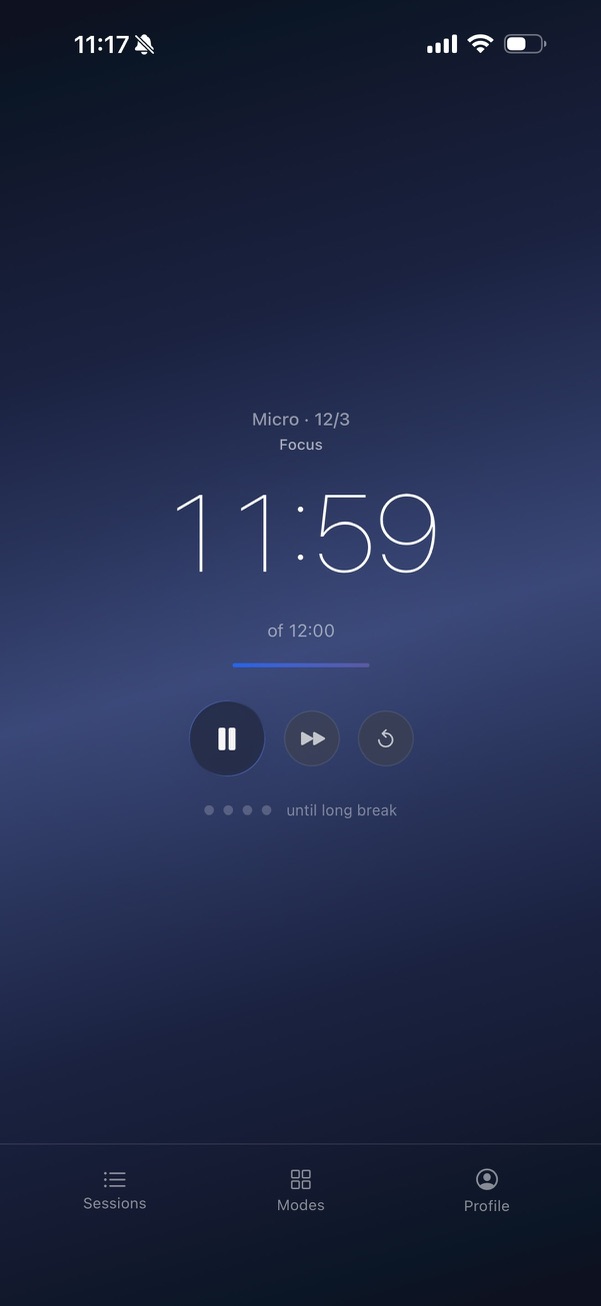
The iOS build keeps the same six modes and check-in model, with mobile-native ergonomics:
- A single full-screen surface — countdown, mode label, and “of 12:00” caption all read at a glance from across a desk
- Pause / skip / reset are large round controls sized for thumbs
- The pip row shows where you are in the multi-cycle arc (four cycles before a long break in Pomodoro, two in Micro)
- Bottom tab bar splits Sessions (history), Modes (switcher), and Profile (analytics + settings) without burying anything more than one tap deep
Modes picker
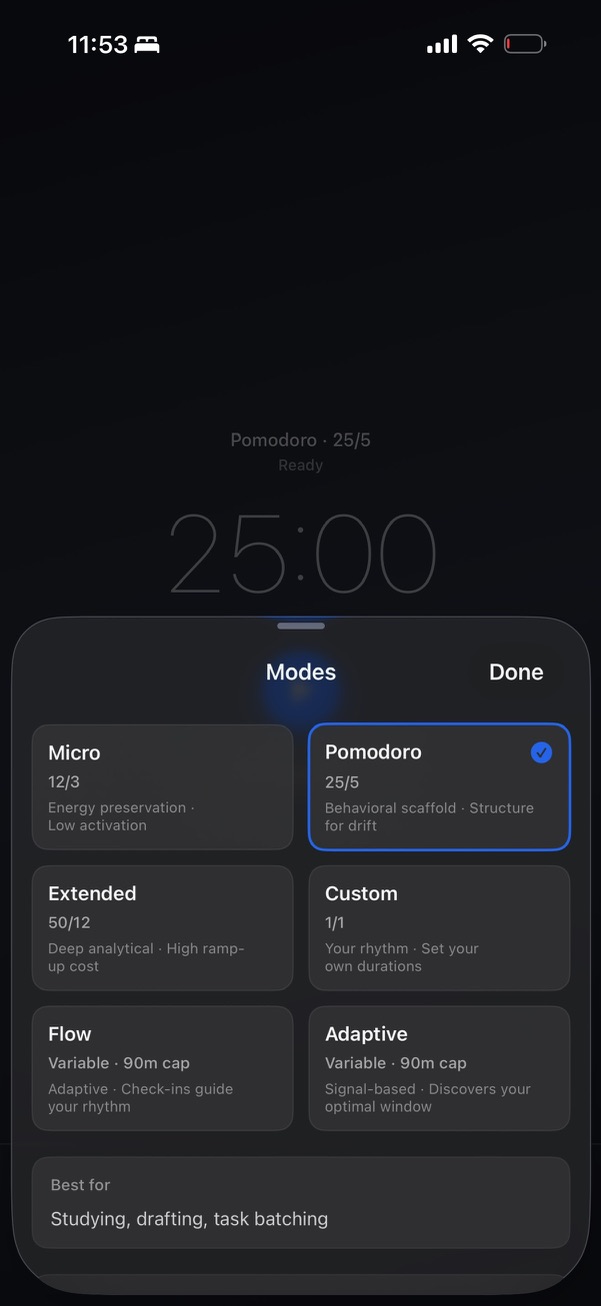
The Modes sheet doesn’t just list durations — each card carries a one-line behavioral hypothesis (“Energy preservation · Low activation”, “Behavioral scaffold · Structure for drift”) and a “Best for” caption updates as you select. The mode itself is a stance, not just a clock.
Tasks alongside the timer
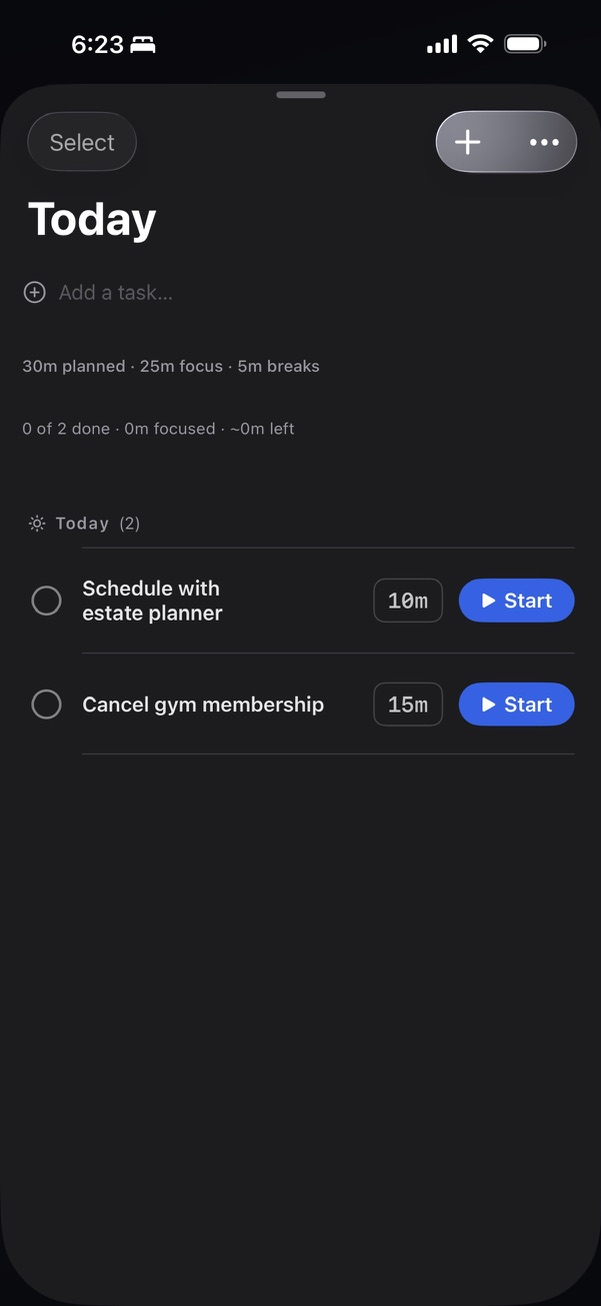
The Today sheet pulls double duty: it’s a task list with per-task time estimates, and each task’s Start button kicks off a focus session pre-loaded with that task’s allotted time. The headline metrics track completed vs planned, focused minutes vs estimated, and remaining time. No separate “start a Pomodoro” flow — the task and the timer are the same action.
The full lineup spans iOS, iPadOS, Apple Watch, and macOS — one SwiftUI codebase with iCloud sync via SwiftData + CloudKit, no servers, no accounts, no tracking.
macOS Build
On the Mac, TruePace lives where deep work already happens — the menu bar — rather than stealing a Dock slot or a full window:
- Menu bar extra — the active countdown and current mode sit in the status bar, glanceable without leaving the app you’re focused in. Click to open a compact session popover; the timer keeps running whether the popover is open or not.
- Menu bar check-ins — graduated check-ins arrive as a subtle status-bar notification, not a modal. “Still focused / Need a break / Wrapping up” is a single click that never pulls you out of your editor or steals keyboard focus.
- Keyboard-first control — start, pause, skip, and mode-switch are driven from the keyboard so a session never requires reaching for the mouse mid-flow.
- Decay signals, desktop-native — the macOS build reads mouse-idle time between active periods (alongside check-in latency and self-reported energy) to inform break-timing nudges. Local only — decay history persists in SwiftData and syncs through your own iCloud via CloudKit, never a server I operate.
- One codebase, native everywhere — the Mac app shares the same six modes, task model, and analytics as iOS/iPadOS/watchOS, with macOS-native chrome and density rather than a stretched phone layout.
Intelligent Check-ins
Rather than a binary timer-done alert, TruePace uses graduated check-ins during longer sessions. At configured intervals, a subtle menu bar notification asks about your current state. The check-in is a single click — “Still focused”, “Need a break”, or “Wrapping up”. No modal dialogs, no app switching, no flow interruption.
Check-in responses feed into session analytics. If you consistently report “still focused” at the 45-minute mark in Flow mode, TruePace learns to delay the first check-in. If you often switch to “need a break” around 30 minutes during afternoon sessions, it adjusts recommendations for that time of day.
Decay Signal Tracking
TruePace tracks proxy signals for focus decay: time since your last check-in response, mouse idle time between active periods, and self-reported energy levels. These signals combine into a decay score that informs break timing suggestions.
The decay model is intentionally simple. Three inputs, weighted average, threshold-based recommendations. No machine learning, no complex modeling. The goal is useful nudges, not surveillance. Decay-signal history persists in SwiftData and syncs through your iCloud account via CloudKit — never a server I operate.
App Activity Monitoring
TruePace optionally monitors which application is in the foreground during focus sessions. After a session, you can see that you spent 80% of your time in your code editor but had two 3-minute detours to Slack. The data helps you understand your own patterns.
Activity data is stored locally and never transmitted. The monitoring uses macOS accessibility APIs with explicit user permission. You can disable it entirely without affecting timer functionality.
Technical Decisions
Native Swift over Electron — A timer lives in your menu bar all day. Electron apps consume 100-200MB for a timer that should use 15MB. SwiftUI provides native menu bar integration, system notifications, and accessibility support without the overhead.
SwiftData + CloudKit — Sessions, modes, check-in responses, and decay-signal history all live in SwiftData models that sync via CloudKit’s private database. No backend, no accounts, no analytics — just the user’s iCloud account doing the cross-device fan-out. Start a Pomodoro on the watch, see the same session reflected on macOS.
One codebase, four targets — iOS, iPadOS, watchOS, macOS share a single SwiftUI codebase. WidgetKit drives the home-screen and Lock Screen widgets plus the Apple Watch complications. Platform-specific surfaces (menu bar on macOS, Live Activity on iOS, complication families on watchOS) compose against the same shared timer state.
No tracking, no accounts — There’s no signup, no analytics, no telemetry. Sync runs through your own iCloud, never a server I operate.